Monitoring Voice Connectivity
Once you have completed the integration between the contact center and the Druid SIP server, you can monitor and validate the connection using the SIP Ladder. This tool provides a real-time visual representation of the SIP events exchanged during a voice session.
Access the SIP Ladder
To view the connectivity data for a specific voice interaction:
- Navigate to History & Logs > Conversation History.
- Locate and select the relevant voice conversation.
- Click the SIP Ladder tab in the top navigation menu.
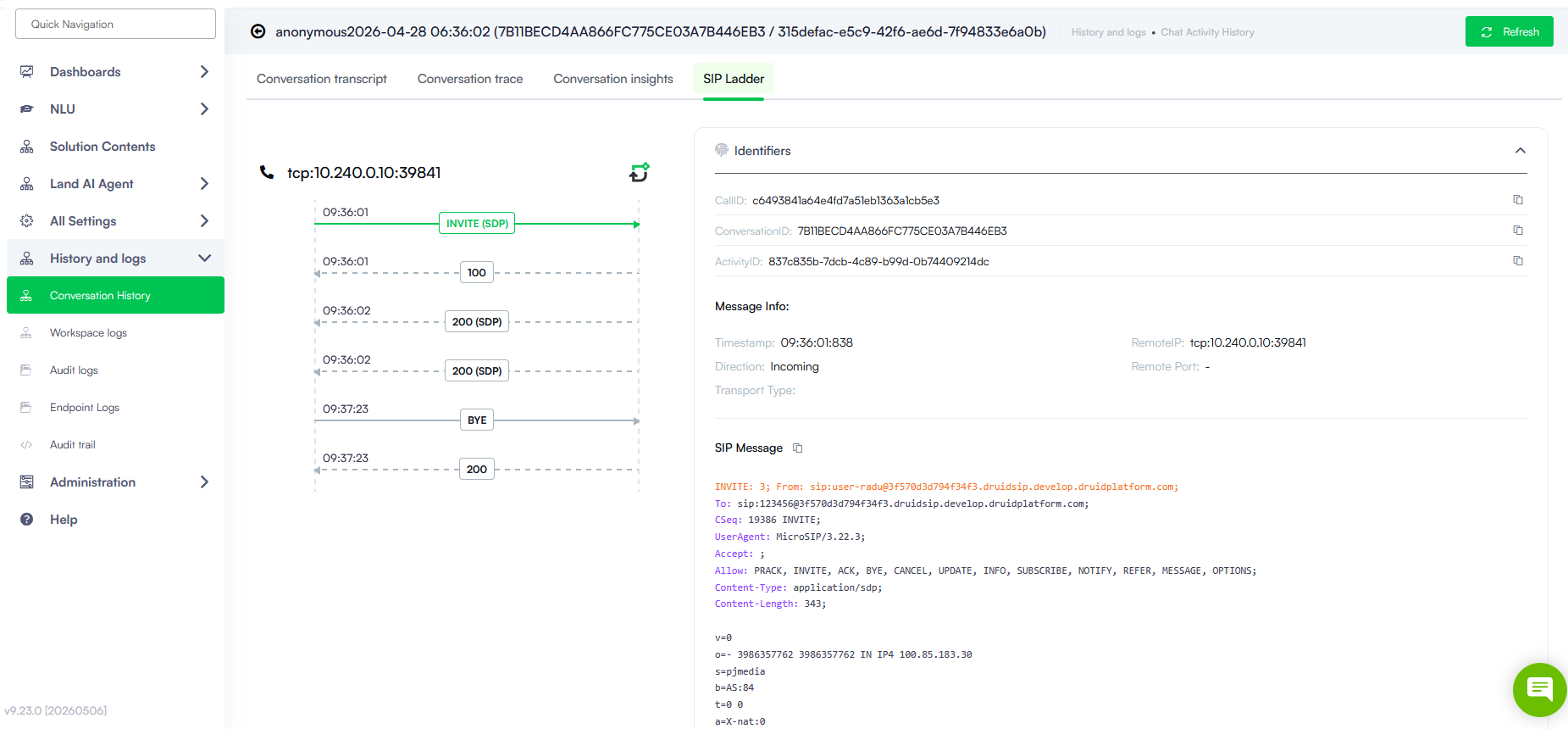
Analyze the Connection Flow
The SIP Ladder interface allows you to trace the signaling path to ensure the AI agent is communicating correctly with the external telephony system.
Ladder Diagram
The central diagram (as seen in image_776932.jpg) displays the chronological message flow. Each arrow represents a SIP request or response:
- INVITE: Indicates the start of a call setup.
- 200 OK: Confirms a successful connection or command.
- BYE: Shows the formal termination of the call session.
Connection Identifiers
The Identifiers section provides unique keys essential for cross-referencing logs with external systems:
- CallID: The unique identifier for the specific telecommunication call.
- ConversationID: The unique ID of the conversation.
- ActivityID: The ID of the current interaction activity session.
Message Info
This section provides the technical context for the selected SIP event:
- Timestamp: The exact time the SIP server processed the message.
- Direction: Indicates if the message was Incoming or Outgoing.
- Remote IP: The source or destination address of the signal, useful for verifying IP rules.
- Transport Type: Confirms the protocol being used (e.g., TCP or TLS).
Message Inspection
For deep troubleshooting, you can click any event in the diagram to open the SIP Message viewer. This pane displays the raw data, including:
- SIP Headers: Detailed routing and session information.
- SDP Body: Information regarding audio codecs and media negotiation, which is vital if you encounter "silent call" issues.